
Jira ticketing system: a step-by-step guide for efficient project management

As a ticketing system, Jira splits opinions almost every time it comes up. Some teams treat it like a Swiss Army knife that happens to fold out exactly the blade they need, no matter how strange the workflow. Others reach for that same knife when all they wanted was a screwdriver, and end up frustrated by how many steps stand between “we need a support queue” and actually having one.
So — is Jira a ticketing system you should build your support process on? The honest answer has less to do with Jira and more to do with your team’s workflow. This guide breaks down how the Jira ticketing system works, what a Jira ticket is in plain terms, and where teams tend to trip on the way in.
TL;DR
- Jira ticketing system doesn't come pre-assembled — it's closer to a kit of parts than a plug-and-play app. Teams that spend real time on setup end up with a Jira ticket management system that actually fits how they operate; teams that skip that step often get chaos wearing the costume of structure.
- Jira ticketing works best when there is a proper system built around the tickets: support, product, and engineering use the same underlying data to track issues, resolve tickets, and keep priorities aligned in one place.
- But that advantage only shows up when someone has deliberately designed the custom workflows, custom fields, and automation rules behind it. Left on autopilot, it leads you towards the opposite of the point where incoming tickets pile up, team members lose track of who owns what, and ticket management turns reactive.
What is a Jira ticketing system?
The Jira ticketing system (powered by Jira Service Management (JSM)) is a service desk and IT service management platform that allows teams to handle incoming requests, service requests, and customer issues in one structured place.
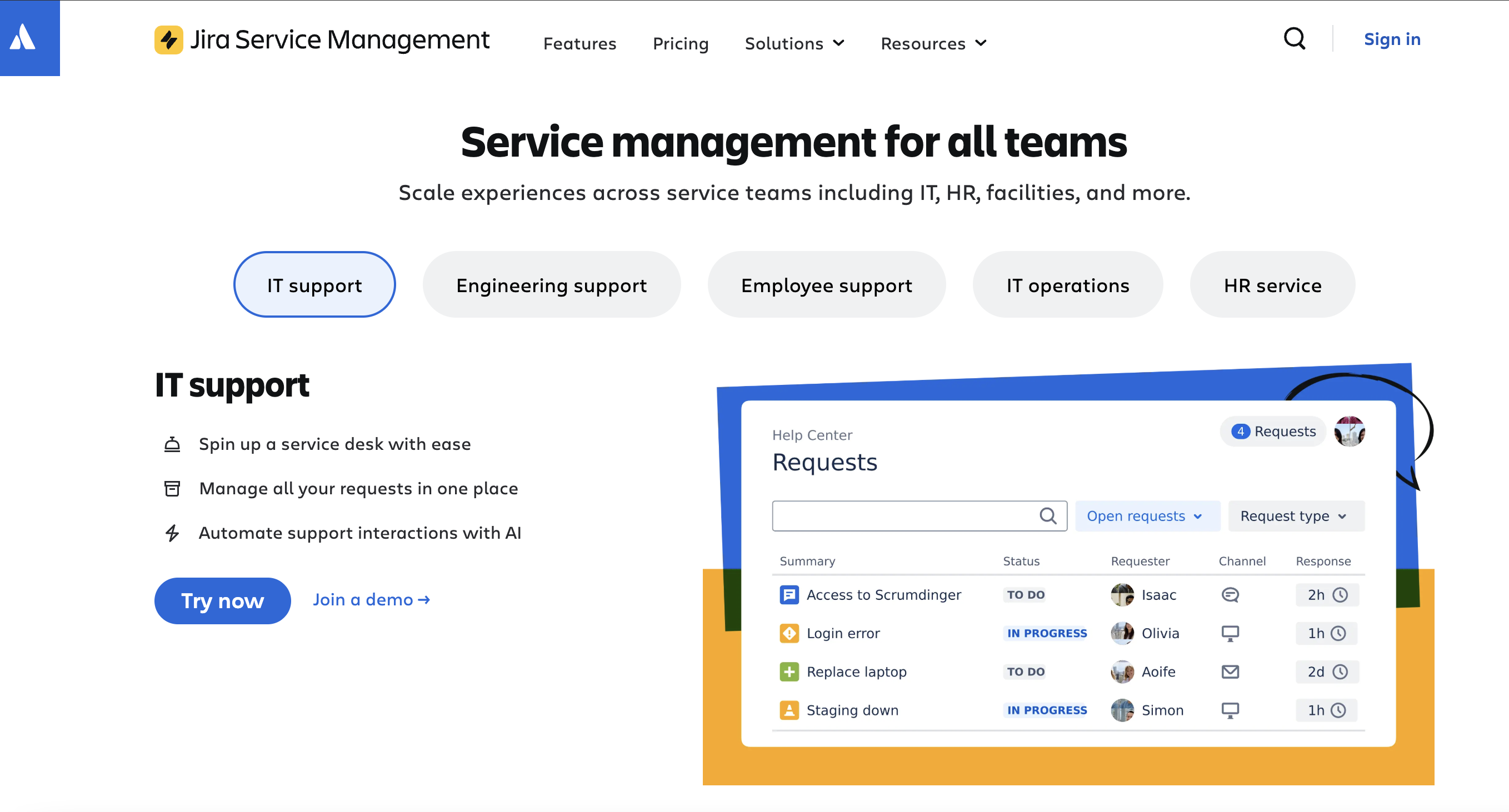
IT is the default use case, but it's far from the only one. HR, marketing, and design teams also run their service management work in Jira. Onboarding, access approvals, equipment requests, office maintenance, and campaign support all slot neatly into a Jira ticketing workflow.
There are really two ways to answer “what is Jira ticketing system”, and a lot of confusion comes from mixing them up:
- As a concept. Any workflow where Jira tickets (issues) are used to structure work and track progress can be thought of as a ticketing setup. In this case, Jira acts as a general project management and work tracking system: Jira software helps agile teams run sprints, manage bug tracking, and stay on top of feature requests.
- As a product. Being a dedicated Atlassian ticketing system designed for support teams and customer support teams, Jira provides a self service portal, queues, SLA tracking, approvals, and a structured ticketing process for handling incoming requests.
Both are legitimate uses of the word. They're just not the same thing, and buying a Jira license expecting one when you actually need the other is a common mistake.
Pricing follows the same split. Jira software, originally built for software teams, is priced and licensed on its own, and leans into linking issues, sub tasks, and general track issues functionality. JSM is priced separately and is built around service level agreements, request types, and customer request handling for support systems. If you run both, they connect through shared projects — which lets an IT support team and engineering actually collaborate.
What is a Jira ticket?
A Jira ticket — or issue, if you want the technical name — is a single piece of work inside the system. If you type “what is a Jira ticket” or “Jira ticket meaning” into a search bar, you’ll usually see it described as a structured record of a task, request, or problem that anyone on the team can open, read, and understand well enough to act on.
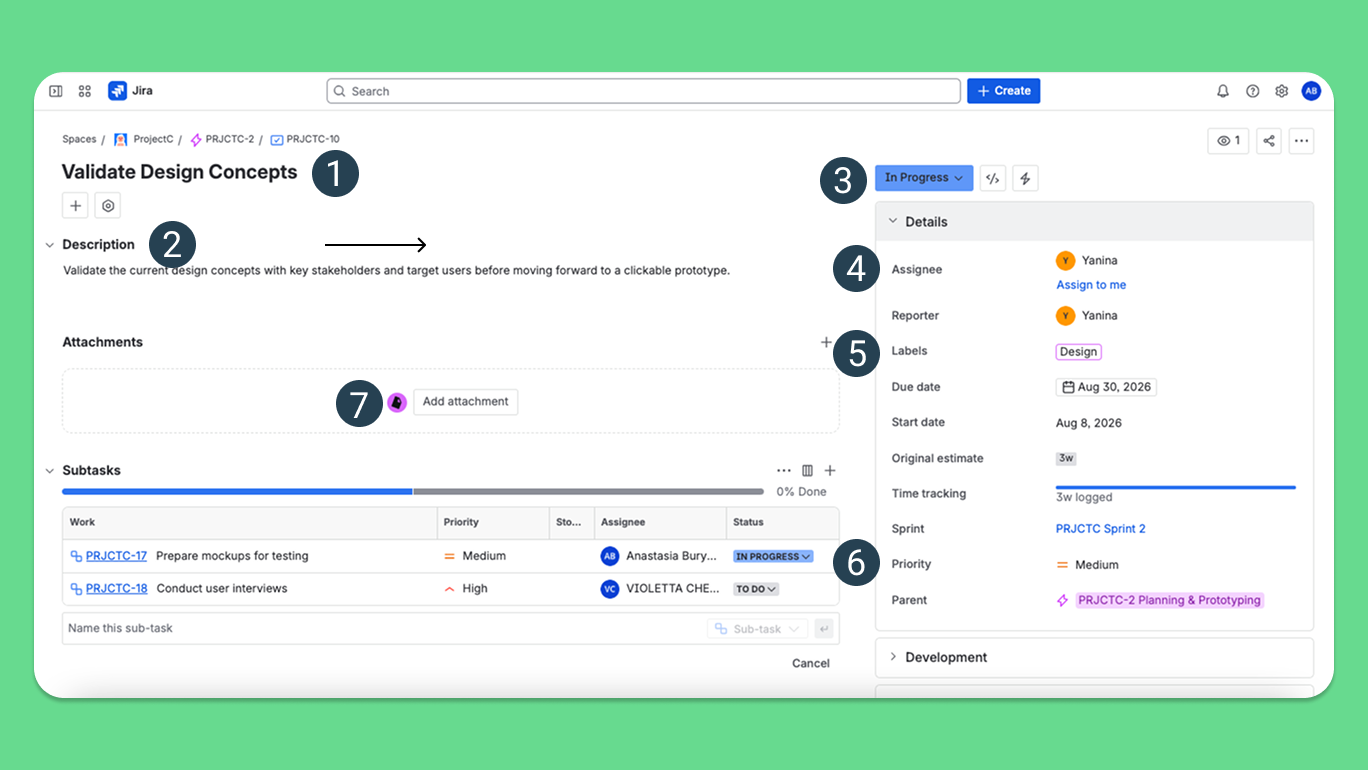
Inside a Jira ticketing tool, that record can stand in for almost anything:
- a service request, like someone needing software access;
- a technical problem or a run of software glitches;
- a feature request from a customer or an internal user;
- a plain support request;
- an internal task assigned to one of your team members.
In practice, people rarely create every Jira ticket by hand. Emails, form submissions, and chat messages — including ones from Microsoft Teams — can be converted into tickets automatically, so incoming requests end up in the same system and are easier to keep addressed promptly.
Life cycle of a Jira ticket
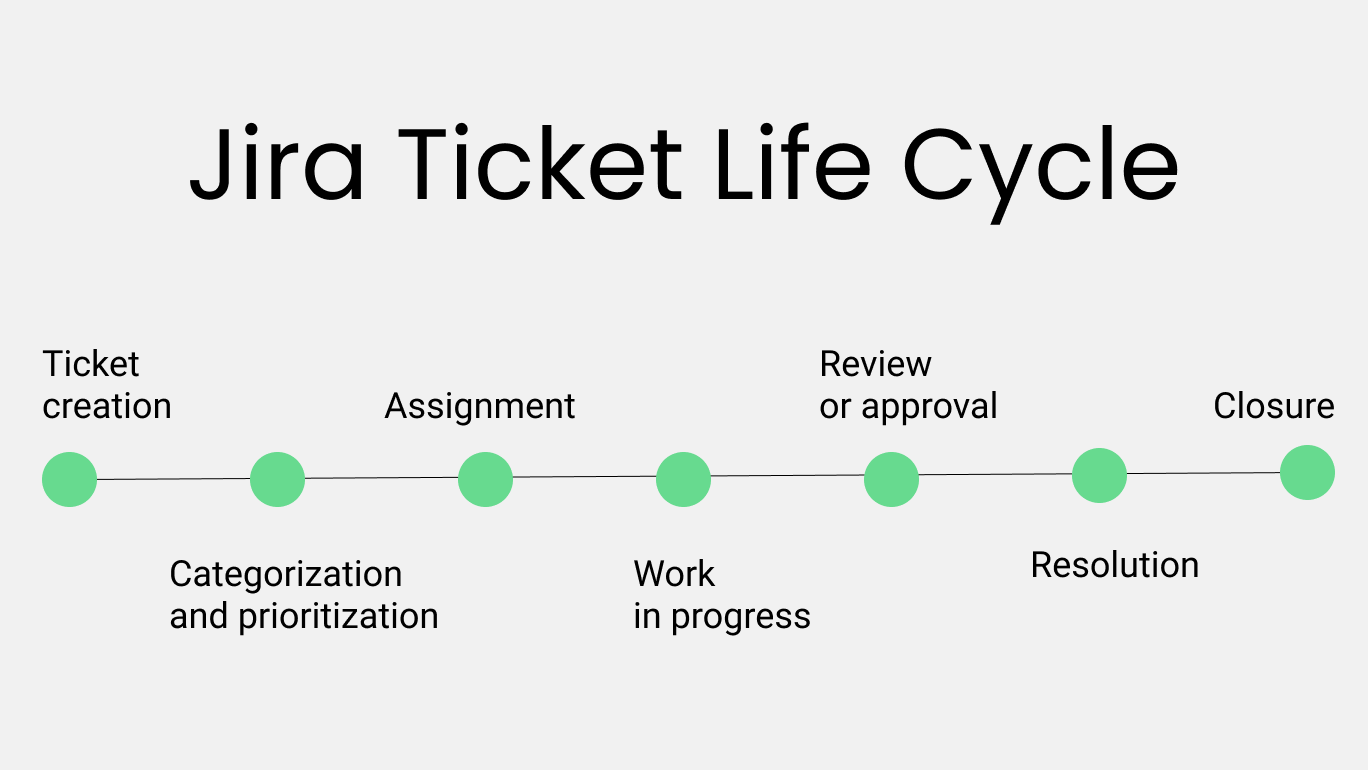
A Jira ticket entry moves through a fairly predictable path, even when teams bend the specifics with their own custom workflows:
- Creation. A request lands via portal, email, or API to become a ticket.
- Categorization and prioritization. It gets a ticket type, a label, and a priority based on urgency and impact.
- Assignment. Someone owns it. When tickets are assigned clearly, accountability across support teams becomes much easier to track.
- Work in progress. The assignee investigates, which might mean linking issues, spinning off subtasks, or escalating if it's bigger than it first looked.
- Review or approval. The assignee isn’t the final stop; there’s a stage where another person reviews the work and decides whether the ticket can be closed
- Resolution. The problem gets fixed, and the team can officially resolve tickets or resolve incidents.
- Closure. The ticket closes and becomes a small contribution to valuable insights, team performance data, and continuous improvement down the line.
How a service project works in Jira (in 4 simple steps)
In Jira Service Management, work from support and business teams is grouped into what Jira calls service projects. Each service project is a dedicated space where a team handles incoming requests, applies its own workflows and service level agreements, and runs its ticketing process end to end. Once you see it this way, it’s easier to understand how a typical service project works from the inside.
Under the hood, most Jira Service Management projects run through the same four stages:
Step 1: Set up your service project
Create a service desk project inside JSM and define your request types, queues, and default request types for both internal users and outside customers.
Step 2: Configure intake channels
Turn on a self service portal, plus email or chat integrations. It’s important that incoming tickets arrive through a consistent front door.
Step 3: Define workflows and SLAs
Build customizable workflows, add approval steps where needed, and set up sla tracking so tickets get handled inside the window you've promised.
Step 4: Process and improve
Handle customer requests, track progress, and actually look at the reports afterward to identify bottlenecks — this step is where most of the long-term value hides.
How to set up a Jira ticketing system?
For all the moving parts of your work to behave like a system, you have to set up your Jira ticketing system as a connected whole from the start: think through the structure, define the links, and wire up the integrations. Here’s the basic checklist of what needs to happen in the early stages.
- Create a service project. Start in JSM and pick a template close to your actual use case.
- Define request types. Set up structures for incidents, requests, or access tasks — whatever your team fields most.
- Configure workflows. Create custom workflows that match your real ticketing process.
- Add fields and forms. Use custom fields to capture the right information at ticket creation.
- Set up automation. Build automation rules for routing, prioritizing, and taking repetitive tasks off someone's plate.
- Build queues and views. Organize incoming tickets so teams can prioritize tasks easily.
- Enable integrations. Integrate Jira with Slack, Microsoft Teams, or whatever your team already lives in.
Key benefits of Jira as a ticketing system
Configured properly, a Jira ticketing system earns its keep in ways that show up very clearly in real users’ stories. In broad strokes, it cuts down on chaos between teams and projects, reduces the amount of manual work, and makes the overall workflow easier to see and trust. The points below reflect the benefits teams most often mention when they explain why they stayed with Jira instead of switching to a simpler help desk.
- A single platform that covers both project management and everyday ticketing system work.
- Real customization that lets you adapt Jira to your specific case through custom workflows and custom fields.
- Tight alignment between support teams and software development: a Jira ticket raised as a support request can become a linked engineering issue in just a couple of clicks.
- A range of automation features that cut down on manual work by routing incoming tickets, updating statuses, and handling repetitive tasks.
- A wide ecosystem in the Atlassian Marketplace, with hundreds of focused apps that cover specific gaps in ticket management, reporting, or self service for different types of teams.
- Reporting tools detailed enough to say something meaningful about team performance and customer satisfaction.
Common challenges with Jira ticketing
Jira can be a strong ticketing system, but it’s far from a free win. It comes with a few recurring challenges teams talk about quite openly.
A real learning curve for new team members
Flexibility always comes with the same trade-off: new people have to understand projects, issue types, workflows, and permissions before they feel comfortable working with jira tickets.
Costs creep up as the team grows
Licensing JSM per agent and paying separately for key apps and integrations means the total price climbs with every new hire.
Permissions that are powerful but confusing
Because permissions are spread across several layers, small changes can have unexpected effects like hiding whole groups of Jira tickets from a team, or leaving a queue visible only to admins
Overengineering risk
With too many custom workflows, states, and custom fields, the ticketing process often becomes harder to follow than the work it’s supposed to organise.
Ongoing admin work
Keeping Jira healthy is a full-time job: someone has to prune old workflows, clean up abandoned fields, and revisit automation on a daily basis.
Overkill for simple support needs
For teams that just need to log straightforward support requests and close them, JSM can feel heavy.
Best practices for using Jira as a ticketing system
We’ve gathered some advice for using Jira as a ticketing system that tends to work in real teams. If it has helped us, there’s a good chance it’ll help your team too.
- Start with simple workflows, add complexity step by step as the team outgrows the basics.
- Map the process before you build it: sketch how Jira tickets should move, then translate it into a workflow.
- Automate repetitive tasks early. If you find yourself assigning the same kind of ticket to the same team members or sending the same reminder more than three times in a row, it’s time to put an automation rule on it.
- Standardize your ticket type definitions. Make sure “incident”, “service request”, “change,” and other ticket types mean the same thing across teams.
- Keep request types human-friendly by using names and forms that make sense to internal users, so they can choose the right service requests without guessing.
- Review queues on a schedule. Once a week or once a sprint, scan your queues for overloaded areas and stale incoming tickets that have stopped moving.
- Clean up regularly: treat workflows, custom fields, and schemes like a garden: if you only plant and never prune, the whole thing turns into a thicket.
- Keep support teams and software development working in the same Jira universe, linking issues instead of copying them between tools.
How Planyway makes Jira ticketing workflows easier
Planyway is one of the most powerful ticket management tools to visualize Jira's ticketing system on the timeline view to distribute tickets among team members and track their status. The app makes it much easier to track progress, spread work evenly across team members, and catch overload early.
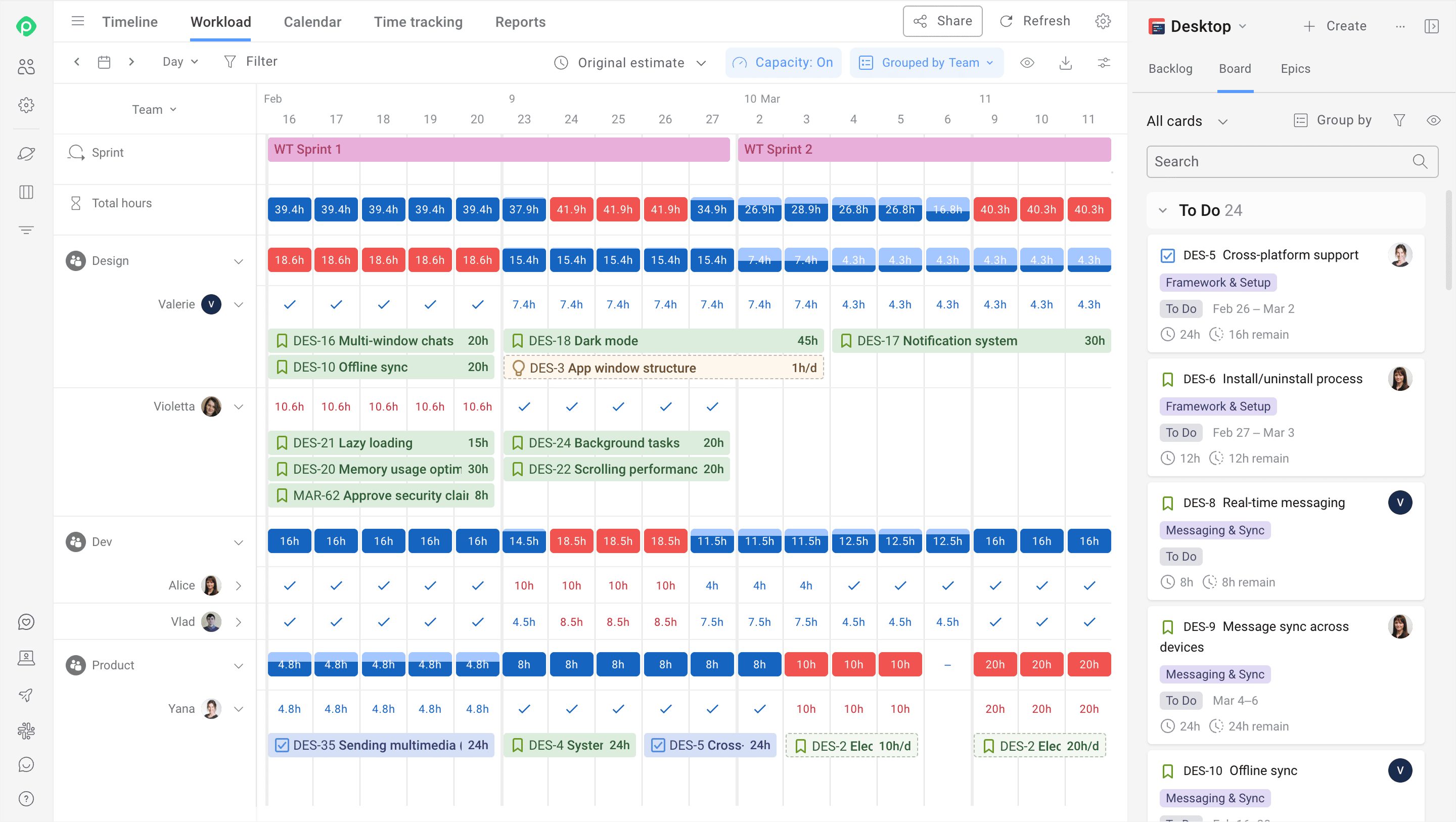
With Planyway, an IT support team or customer support team can:
✅ Visually prioritize tickets and deadlines.
✅ Balance workload across the right team members.
✅ Identify bottlenecks and spot delays early enough.
Planyway also strengthens team communication across projects, helping teams resolve issues faster and lift customer satisfaction in the process. It works with both Jira Cloud and Data Center, so you're not rebuilding your ticketing process.
Is a Jira ticketing system right for you?
A ticketing system Jira approach tends to make sense if:
- You're already in Jira for product or engineering work and want to extend it into support.
- Your workflows are genuinely complex, and a boxed help desk product feels too rigid for how you actually operate.
- You need support and development tightly linked.
- You want real control over workflows, fields, and automation.
- Your team is willing to spend time on setup and iteration, because this isn't a same-day deployment.
JSM is a flexible frame you thoroughly build around your own process. That's either exactly what you're looking for, or considerably more than you need.
Wrapping up
As a ticketing system, Jira was never meant to be a five-minute setup, and that's the deal you're signing up for. In exchange for the configuration time, you get a ticketing system that matches your team’s work. If that trade feels worth it, the next move is picking a template and building your first workflow.


FAQ
A Jira ticket is a structured record representing a task, issue, or request inside Jira. In simple words, a Jira ticket is also a digital record used to track issues and manage the work behind them.
Bugs, tasks, stories, incidents, and service requests are the most common types of tickets in Jira, though the exact list depends on how the project is configured.
Jira, ServiceNow, Zendesk, Freshdesk, and Help Scout are the top 5 ticketing systems that come up most often in comparisons. However, to select the best, the team should take it from their unique needs and support processes.
Jira is a ticketing tool and a ticketing system when you use it through Jira Service Management. It is also a well‑known work management platform for teams that never touch the service desk side, especially through products like Jira Software and Jira Work Management
There is no particular difference between Jira issues and tickets; they point at the same thing. “Ticket” is the word people commonly reach for once it's sitting in a support queue.
A Jira ticket can be created through the UI, an email, an API call, or a portal. Any of these feed into the same ticket creation process, whether it's a customer request or an internal task.
In Jira, ticket types can vary by setup, but incidents, requests, tasks, and feature requests cover most of what teams configure by default.